

Your fax line is burying your staff. SinaAI clears it.
SinaAI Fax handles your incoming faxes for you. It matches each one to the right patient, files it to the chart and lets the right person know, inside your EMR. No retyping, no hunting for charts.
- 2+FTEs of fax workHandled in a clinic of 5–8 practitioners, so your team can get back to patients.
- 200+hours saved every monthStaff time that would otherwise go to sorting, matching and filing faxes, in a 7-physician clinic.
- 90%+of faxes filed automaticallyThe rest wait for your staff, with everything already gathered.
- Averages from live usage across clinics running SinaAI Fax.
The daily fax burden
How manual fax intake adds to the clinic workload.
High document volume
Incoming documents create constant intake pressure.
Multi-clinician routing
Documents must reach the right clinician or staff queue.
Manual sorting and filing
Sorting, matching, and filing consume valuable staff time.
Renewal back-and-forth
Pharmacy renewal requests add repetitive back-and-forth and follow-up.
Each incoming fax needs the right chart, the right recipient, and a clear next action.
What we handle for you.
Everything between a fax arriving and the right person seeing it.
- Find the right chart and confirm the patient before anything is filed.
- Fill in the right form for each type of document.
- File to the correct chart in your EMR.
- Notify the right person, whether that's a physician, an MOA or another staff member, even on a shared fax line.
- Summarize the key information, so staff and physicians don't have to read the whole fax.
- Bring in lab results from OLIS, filing the OLIS report in place of the faxed copy.
- Keep an audit trail of what was received, filed, routed or left for staff.
- Incoming fax
- SinaAI Fax
- The correct chart
- The right physician or staff member
The right document. In the right place. For the right person. Faster.
Every fax, handled for you.
From the moment a fax lands to the moment it's in the right chart, SinaAI Fax does the work. Your staff only see the few it isn't sure about.
- 1Finds the right chart. It works out who each fax is about and confirms the patient.
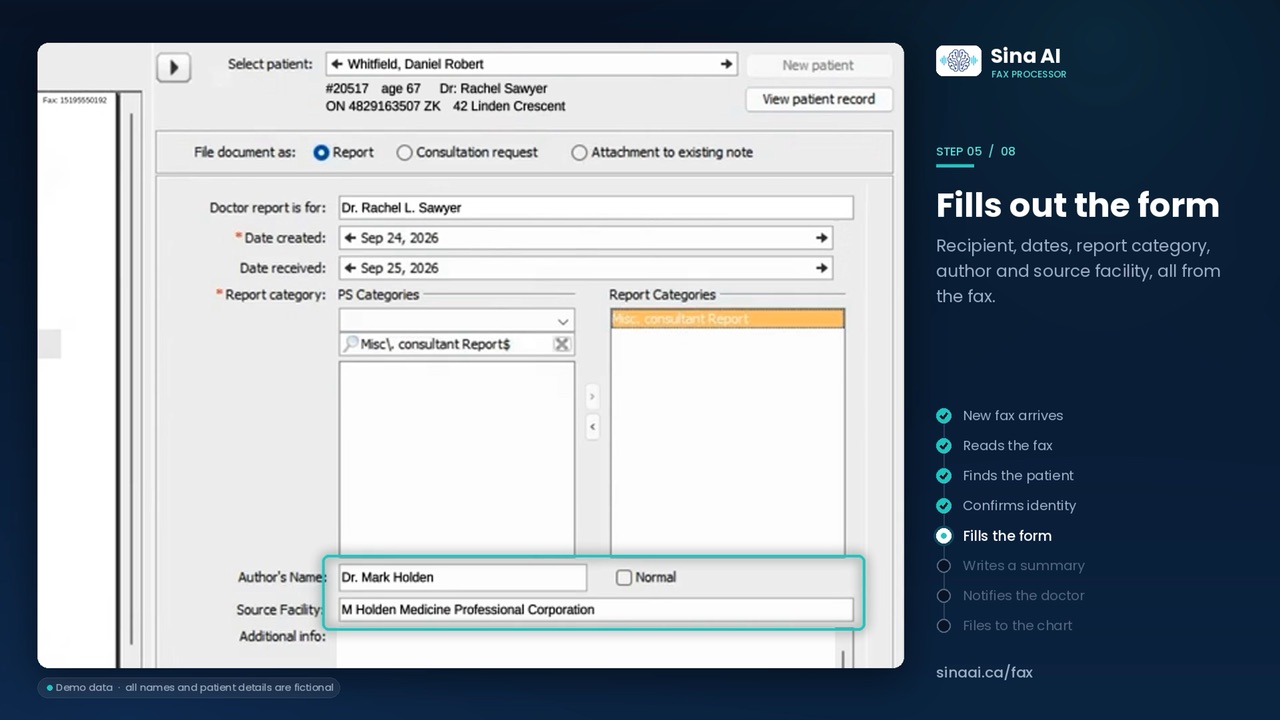
- 2Files it. The fax goes into the chart with the right form filled in and a short summary.
- 3Lets the right person know. The physician, MOA or staff member who needs it is notified, and it moves on to the next fax.
Works inside the EMR you already use.
Built into PS Suite, Accuro and OSCAR Pro, and connected with hospital and specialty systems too.
 PS Suite
 Accuro
 OSCAR Pro
Also connected with






And with the way your faxes already arrive.



 Gmail
 Outlook
 Any email inbox
- Your EMR's fax inbox
- Your fax machine or scanner
- A custom setup for your clinic
Don't see yours? Contact us. Most integrations are quick.
Renewal requests, straight to the physician.
SinaAI Fax recognizes pharmacy renewal requests, files them to the patient's chart and sends them straight to the physician's inbox in your EMR.

Automation that puts accuracy first.
Over 90% of faxes are filed and routed automatically. If it isn't sure, it doesn't file: the fax waits for your staff instead.

High confidence
Filed and routed- Filed to the correct chart
- Routed to the right person
- A visible audit trail of what was received, filed, routed or left for staff

Needs a second look
Staff review- Held when there's no confident patient match
- Held when the health number doesn't match
- Staff confirm the patient and destination before anything is filed
One onboarding call. One small device. That's the setup.
A short onboarding call to understand your clinic's workflow, then a device that arrives ready to plug in.
- About 30 minutes
1. An onboarding call to understand your clinic's workflow
We map your routing rules, pharmacy renewals and staff review preferences around the way your clinic already works.
- Arrives ready
2. Your device arrives, configured for your clinic
A compact unit, about 12 by 12 inches, set up for your EMR before it ships.
- About 5 minutes
3. Plug in and go
Plug it in and it starts working inside your clinic.

Your clinic stays the custodian. The device stays in your clinic.
PHIPA and HIPAA compliant. Data residency is chosen by the customer; Canadian hosting is available.
Read the security and privacy page- Your clinic remains the health information custodian.
- The device stays in your clinic.
- Information is processed only to deliver the service.
- Fax content is never used to train AI models.
- No sale of PHI, no advertising use.
- PHIPA and HIPAA compliant.
What clinics say
From the people who run the front desk.
Our MOAs can finally focus on answering phones and helping patients.
The faxes still come in. We just don't spend our mornings sorting them anymore.
We were up and running within a week. Our staff didn't need to learn a whole new system.
Flat per-clinician pricing. Unlimited faxes.
Cancel anytime, no hidden costs. Try it free in your clinic.
- Flat per-clinician pricing
- Unlimited faxes
- Cancel anytime
- No hidden costs
- Free trial after your demo call
Try it on your fax line
Tell us about your clinic and start a free trial, or book a 15-minute demo first.
Questions clinics ask
Which EMRs does SinaAI Fax work with?
What happens when it isn't sure which patient a fax belongs to?
Does it work with OLIS?
Where does the processing happen? Is the device in my clinic?
Where is patient data stored, and who controls it?
Is fax content used to train AI models?
How long does setup take?
How is it priced?
Can staff override or correct what it files?
Know a clinic buried in faxes? Refer them and you each get a $200 gift card.
When a clinic you refer signs up for SinaAI Fax, we send a gift card to you and another to them.

Also from SinaAI: an AI scribe for the exam room.
SinaAI Scribe writes the note while you talk with your patient, in templates built from your own notes. 14 days free, no card.
Let SinaAI handle your faxes.
- A 30-minute call to understand your clinic's workflow
- Your device arrives ready to plug in